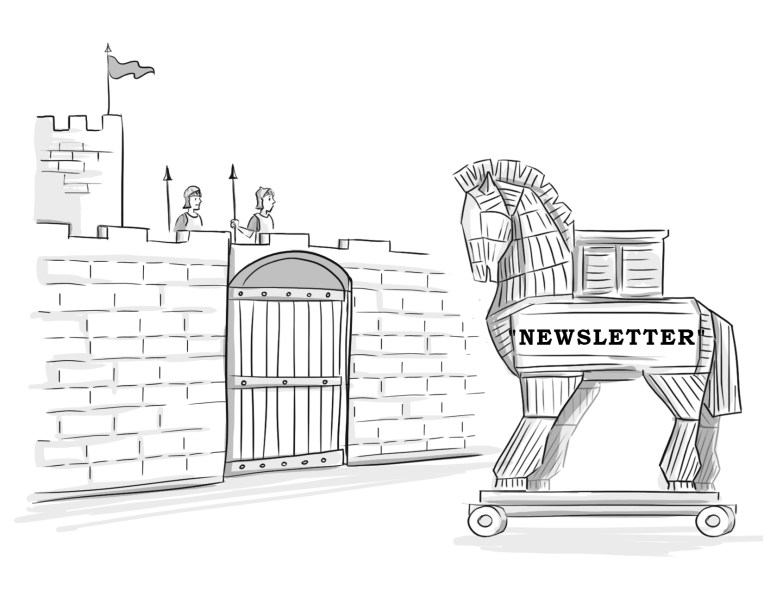
An author newsletter is also an excellent way to market your book. However, don’t be book self-promoting every single time. So if you aren’t selling, what are you writing about in your newsletter?
You should write content that would be interesting to your readers. Providing useful, informative, or entertaining particulars increase the chance that your readers will peruse, read, and maybe even look forward to your periodic missives.
If you are a middle-ages romance novelist, perhaps you could share some historical tidbits you discovered while researching your soon to be released Scottish highland book. If you write about homesteading, how-to articles are always well-received.
Get your readers involved with polls or surveys. What do they want to read about? Which cover is more appealing? What would they do if….?
Share your upcoming promotions. If you had a book signing recently, write about it. Include pictures and links to where newsletter subscribers can get a signed copy for themselves. If you do a podcast, include a link. If you have a Q&A session on Facebook Live coming up, invite them to join you.
Tell an entertaining or embarrassing personal story. Talk about how your cat Fluffy has been helping or hindering you as you write your soon-to-be-released book. Give readers your writing playlist, favorite inspirational quotes, or writer’s block brownie recipe. Bonus points if you can tie in your next book.
You could include articles written from the perspective of your book characters. Or tie in the holidays to an upcoming or past book. Remember when Janie broke Paul’s heart right before Christmas in Jingle Bells, Chrismas Sucks–A Holiday Romance? Well, this Christmas, here’s how you can avoid family drama…
A newsletter helps you make a personal connection with your readers. Those that sign up are already interested in your books, so why not capitalize on it? Unlike Facebook or Twitter, you own the newsletter. You don’t have to worry about changing algorithms affecting the visibility of your posts or having the platform disappear completely. Remember Google +?
Mailchimp has free plans, pay-as-you-go plans, as well as several other monthly plans. With any plan, you can use ready-made templates to drag and drop your content, links, and images. The free plan allows you to contact up to 2,000 subscribers and send up to 12,000 emails per month. Because Mailchimp integrates with Twitter, Facebook, and WordPress, readers can sign up for your newsletter through these platforms as well.
Another email option is Mailerlite. The free plan will let you contact up to 1,000 subscribers and send 12,000 emails per month.
Remember not to spam your subscribers and to include an unsubscribe option at the bottom of the newsletter.
Post a link to your newsletter sign-up page on your Twitter, Facebook, and website. Offer a freebie in exchange for their opt-in. You could offer sample chapters, novellas, checklists, writing tips and tricks, or something else that you think your readers might enjoy.
The key to a successful newsletter is offering content that has value, such as useful information, personal connection, free/bargain books, and so on. If you don’t think you are up to the task, then don’t try to force yourself to create a newsletter. Focus on other methods of social media publicity instead.
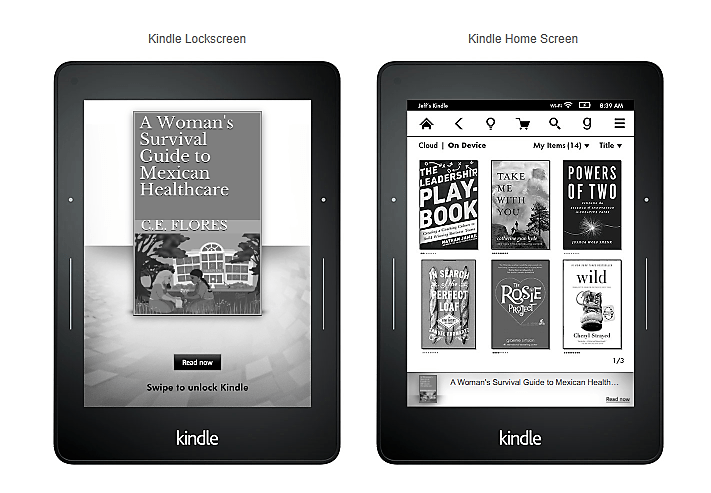
Lockscreen ads appear on Kindle and Kindle Fire devices of people that have read a book related to one of your target words in the past. Lockscreen ads are only available for eBook promotions, not paperback.
They are charged on a cost-per-click. So if no one clicks on your ad, you aren’t charged for it. When readers do click on your ad, they are taken to your eBook’s detail page on Amazon. These types of ads are only available on Amazon.com.
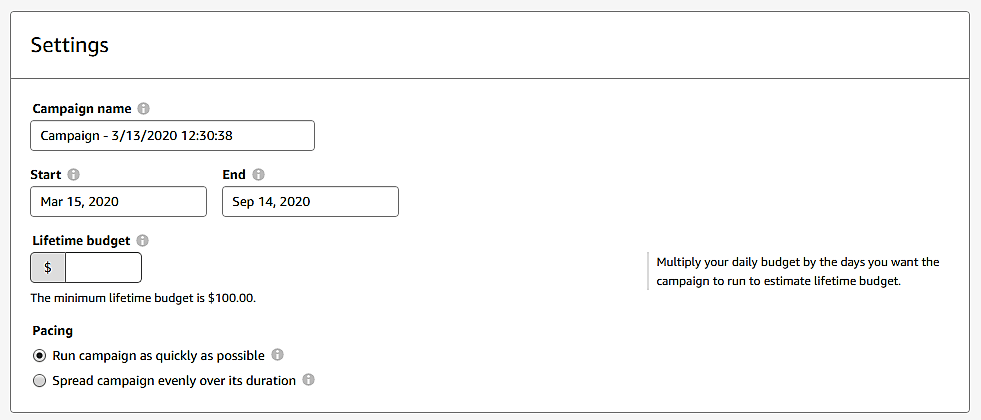
After choosing the Lockscreen ad option, you’ll be taken to the page to set up your ad campaign. Here, you will enter a campaign name to help you keep track of different ads. It’s not information that is visible in the ad. It is for your organizational use only.
Then choose a start and end date for the ad campaign. The start day will always be two days from the date you submit the campaign to Amazon for review. Amazon recommends you run your ad campaign for at least four weeks.
To figure out what your lifetime budget is, multiply the number of days you want the ad to run by your daily budget. The minimum lifetime budget is $100, so you’ll have to plan to spend at least that much for each ad campaign. Remember, if no one clicks on your ad, you aren’t charged with this sort of campaign, so that $100 could stretch out quite a while.
If your goal is to generate clicks quickly, choose the Run campaign as quickly as possible option. If your goal is to make the most of the time you have decided to run the campaign, then select Spread campaign evenly over its duration.
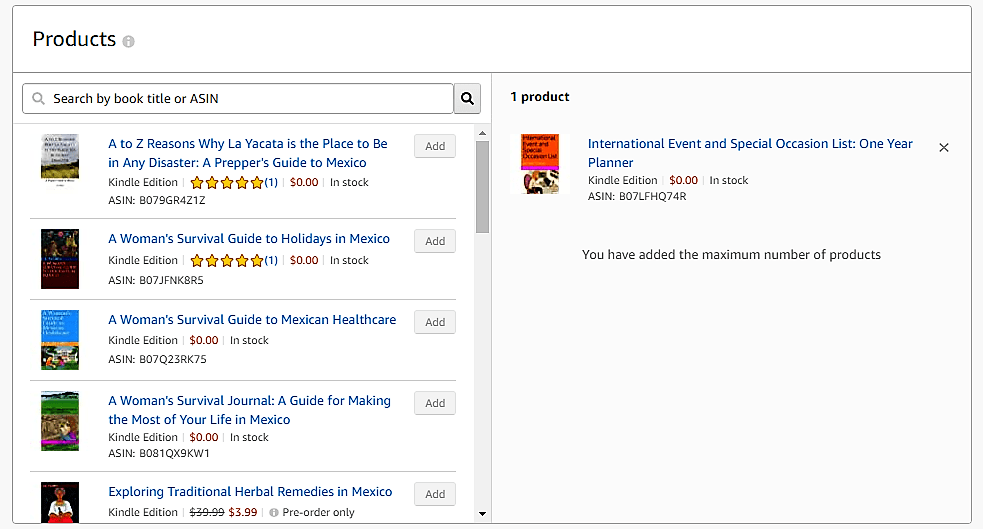
Products
Under products, you’ll see all your current eBooks. Choose the eBook you want to advertise in this ad campaign.
Interest Targeting
In this section, you will choose genres or interests that you want to target with your ad. You can choose as many as you like. Under each category, you can target all or select only the most relevant.
Bidding
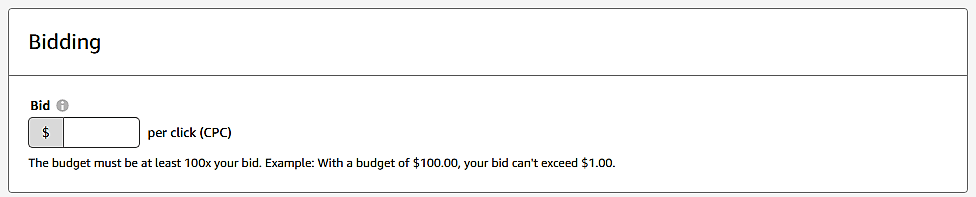
Your budget must be 100 times your bid per click. So if you have entered a lifetime budget of $100, your bid per click can not be more than $1.00.
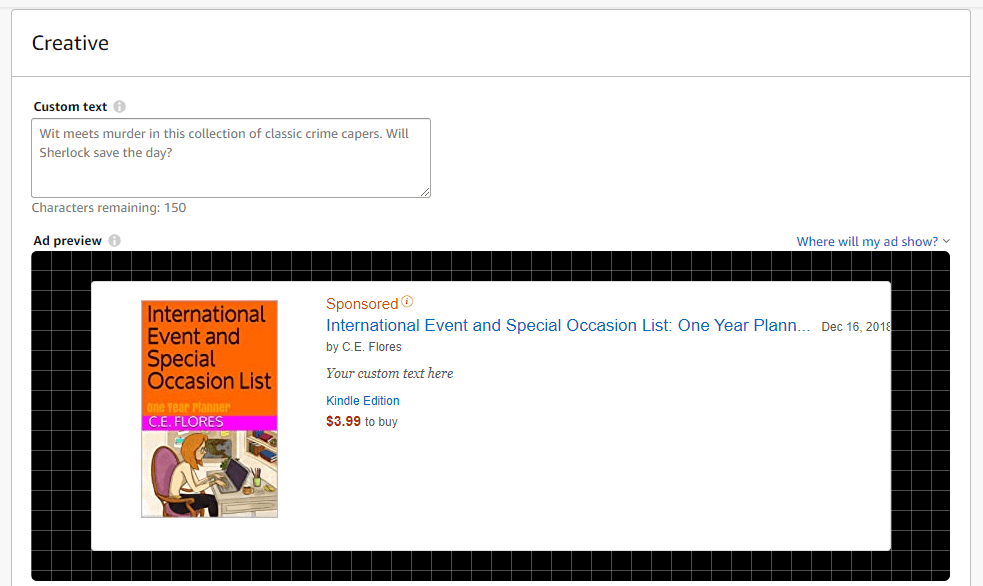
Creative
You can enter a custom text to entice potential readers. It should be at least 50 characters and no more than 150 characters. Below this you can see a preview of what your ad will look like on the Kindle lockscreen and the Kindle home screen.
Submit for Review
You will not be able to edit any part of your ad campaign once you have submitted it for review, so check everything carefully before you do so. Amazon will email you once it has been approved or if you need to make changes. This process can take up to three business days.
If your eBook ad is rejected, review Amazon’s book ad policies. Your cover might be too racy for all audiences or your book subject might not be considered appropriate for some groups of people.
Once you set up your ad account, you’ll see that there are two options to choose from: Sponsored products and Lockscreen Ads. In this post, we’ll discuss sponsored products campaigns.
Select the corresponding ad type. You’ll be taken to a page to enter the details. Create a campaign name to help you keep track of different ads. It’s not information that is visible in the ad. It is for your organizational use only.
Then choose a start and end date for the ad campaign. If you don’t designate an end day, it will continue indefinitely. If you want to extend the ad campaign past the end date, you can change the end date anytime before the date you had originally chosen.
Decide on a daily budget. This is the amount you are willing to spend on ads during a 24-hour period.
Next, you’ll need to determine whether you want to go with automatic or manual keyword marketing. If you have no experience at this, you’d do best to let Amazon choose the keywords for your book. Once you have done a few ad campaigns, you can refine the keyword targeting to best reach your potential readers.
Campaign Bidding Strategy
Now you’ll need to decide how to create a range of bid prices. Remember, Amazon will always choose the highest bid within the category to display since it will make them the most money, so this step is important.
Dynamic bids change depending on the likelihood of a sale. So if someone has searched for books about holidays in Mexico and your book is about traveling in Mexico, it’s not a perfect keyword match. Amazon will determine how likely the person searching is to be interested in your book based on complicated algorithms.
If you choose Dynamic bids–down only and Amazon determines that the searcher isn’t likely to be interested in your book about traveling in Mexico, then they will charge you less if the person does click on the ad.
If you go with Dynamic bids–up and down, then Amazon will charge you more when it’s a perfect keyword match than if it’s only a partial match. Therefore, if the person is searching for books about traveling in Mexico, then Amazon will charge you the full price. If the person is looking for a book about holidays in Mexico, then they won’t, since it’s not a sure thing.
Fixed bids take the fluctuation out of the equation. You’ll be charged the same price no matter the likelihood of purchase according to the algorithms.
Adjust bid by placement will give you more opportunities to have your book prominently displayed either at the top of the page or on product pages. Remember, it’s a bidding process, so the higher your bid, the more likely Amazon will choose your ad to display over someone else’s ad. Of course, that means you’ll pay more for that privilege.
Ad Format
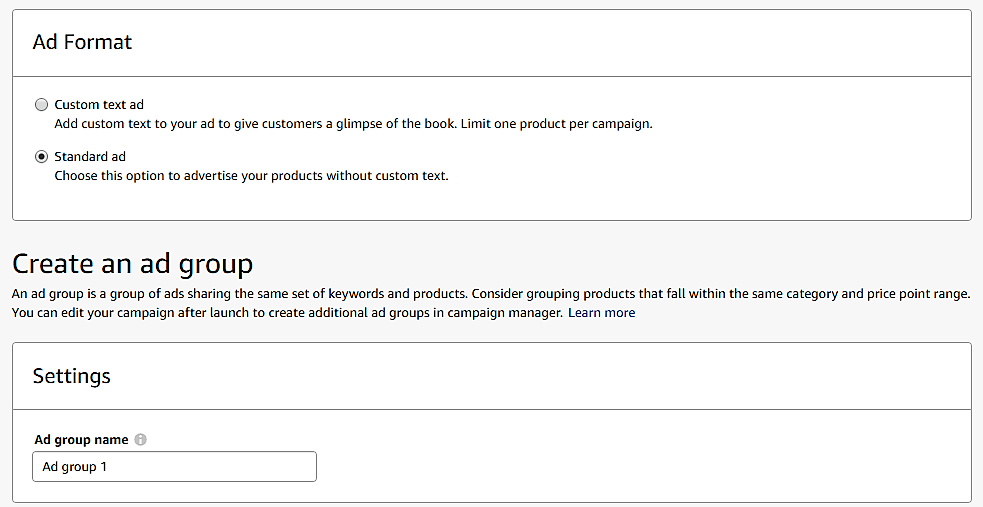
You can either use a standard ad format or a customized one. Custom text is only available on Amazon.com right now. However, if you are using that marketplace to run your ad campaign, you should use the opportunity to hook readers with creative commentary.
If you select the standard ad format you can create an ad group. This allows you to advertise similar books under the same bid parameters and keywords you’ve already chosen.
Products
If you have reached the ad campaign setup page by choosing Promote and Advertise from your KDP If you have reached the ad campaign setup page by choosing the Promote and Advertise option from your KDP bookshelf, then your product is already selected. If not, choose one from your product list.
Automatic Targeting
You can choose the default bid or set the bids by targeting groups. Amazon helpfully supplies a suggested bid for your book as well.
When you set bids by targeting groups, you can change your bid amount depending on if the keyword search is a close or loose match, a word substitute or a complimentary term.
So if your keyword is “holiday celebrations in Mexico” a close match would be “holidays” or “Mexico” whereas a loose match might be “Latin America” or “customs.” A word substitute would be “customs in Mexico” where the word “holiday” is used instead of the term “customs.” “Customs in Latin American” might be a complement keyword phrase. It isn’t exactly what the person was looking for, but your book falls into the general category.
Negative Keyword Targeting
Negative keywords allow you to define who sees your ad based on their search parameters. You can use it to make sure your ad isn’t shown for a particular term because it is irrelevant.
For example, if your book is about Mexico, a negative keyword you could set up is “New Mexico” because people looking for New Mexico are not your target readers, typically. Doing this saves you money since your ad won’t be displayed for New Mexico searches.
If this is your first ad, you might not know what terms to include as negative keywords. You can get a general idea from negative keyword generators online like WordStream. It isn’t absolutely required that you list negative keywords, so don’t sweat it too much.
Creative
Under Creative you’ll see a preview of your ad. You can insert custom text to hook the potential reader if you like.
Submit for Review
If you have already entered your credit card information for billing, you can submit your ad campaign for review. Amazon will then determine if your book meets the requirements and standards set out in the policy guide. If it is, you’ll be billed monthly for the total number of showings during that time period.
Amazon offers a way to reach more potential readers through Amazon Advertising. These ads are run on a cost-per-click auction based model. That means Amazon holds a real-time auction every time someone does a search to determine which ads will appear based on relevancy. The cost-per-click, your “bid” is the amount you choose to pay if someone actually clicks on your ad.
Amazon will always choose the highest bid within the category to display since it will make them the most money. So suppose you have a book about canaries that you want more people to be aware of. Amazon suggests that you bid $0.70 but the bid range for that category is ($0.40 – $1.40). You decide to go with the custom bid of $0.70. However, someone else has a book about canaries and their bid is $1.40. Amazon will choose to show that bid more often than yours when the criteria is met in a search.
Your book cover and book content have to meet certain requirements to even be considered. To see the complete list of prohibitive cover images and book themes, you’ll need to read through Amazon’s book ad policies.
Currently, you can run Sponsored ads on Amazon in the US, UK, Germany, France, Italy, and Spain. Lockscreen ads are only available for the US.
You can advertise books written in languages other than English, but all language in the ad must match the language of the Amazon site where the ad is running. For example, if you want to advertise a book written in Japanese on Amazon.com, the ad must be in English. Also, book titles must clearly state if the book isn’t in the language of the Amazon site where the ad is running.
If potential readers click on your ad, they’ll be taken to the detail page of your book on Amazon. Therefore, before you set up an ad campaign, you should make sure that the layout is eye catching and the book blurb is interesting. Check the visual appeal of your book cover, too.
Creating an Ad Account
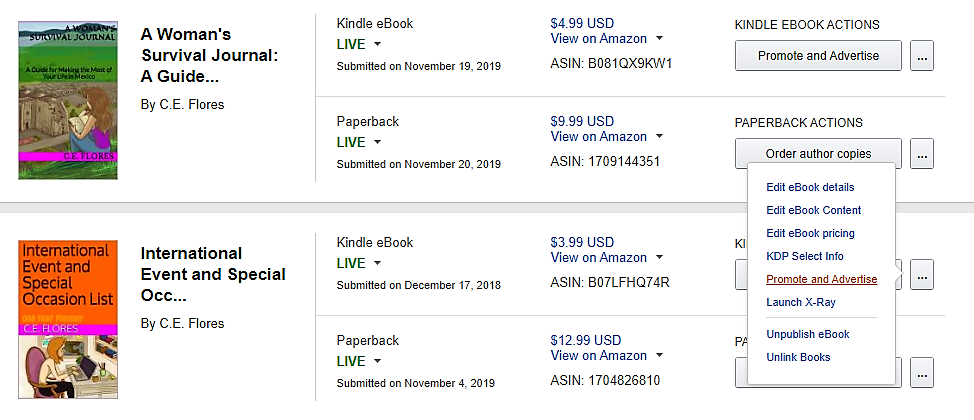
To begin, go to your KDP bookshelf and select a book you want to run a campaign for. Choose Promote and Advertise under the ellipses.
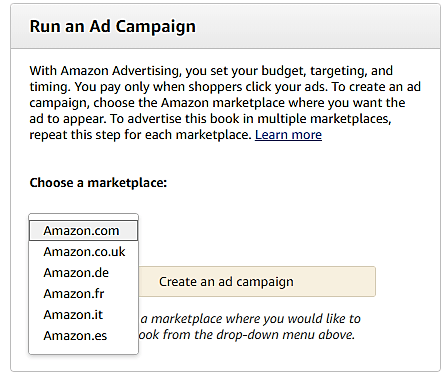
Then you’ll want to look at the Run an Ad Campaign section. Choose a marketplace from the available options.
You’ll be taken to a screen that forces you to accept Amazon’s policies before continuing.
Once you do so, you’ll see that there are two options to choose from: Sponsored products and Lockscreen Ads.
Sponsored products are those that you see across the top after you search for a particular book topic. Lockscreen ads appear on Kindle and Kindle Fire devices of people that have read a book related to one of your target words in the past. Lockscreen ads are only available for eBook promotions, not paperback. We will discuss these individually in future posts.
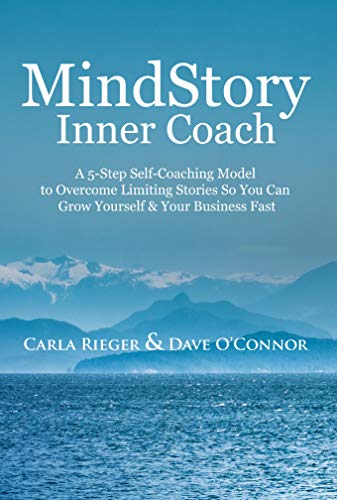
I had some problems initially finding the motivation to read Mind Story Inner Coach by Carla Rieger and Dave O’Connor. The writing in the introduction and first few chapters seem stilted and full of cliches. The personal experiences were wordy rather than concise storytelling. For example, “I was starting from scratch all over again” just seems full of tautology.
Then there was the misquote from Henry David Thoreau at the beginning of chapter two. If the authors were paraphrasing Thoreau’s words from Walden, then that should be made clear because the quote that is there is not found in any of Thoreau’s works.
Despite these stumbling blocks in my reading, I was interested in the theme and persevered. I’m happy to report that it was worth it! The stories were more concise and less wordy, although there continued to be many cliches, after the first few chapters.
The book has five sections with three chapters in each section. Each of the sections detailed the AVARA Model, one for each letter in the acronym. Then each chapter highlighted a subsection of the main categories which included personal experiences from both authors. Additionally, it has self-reflection questions under the heading Homeplay to help the reader apply the information and recommendations found in each chapter.
My favorite section was about identifying and changing our mind stories. It’s true that sometimes we set ourselves up for failure because of the beliefs we’ve internalized. As discussed in this section, discovering our core values is also essential to success, both in business and personal endeavors. The activities designed to help the reader pinpoint the mind stories and core values were excellent. The Commonly Asked Questions section was very helpful in responding to doubts that may arise as the reader works through the AVARA Model.
If you are looking for some assistance in refining your business goals and making informed decisions that align with your core values as you move forward, then Mind Story Inner Coach by Carla Rieger and Dave O’Connor is the book for you.
I received an ARC from Reedsy Discovery. You can read my review here.
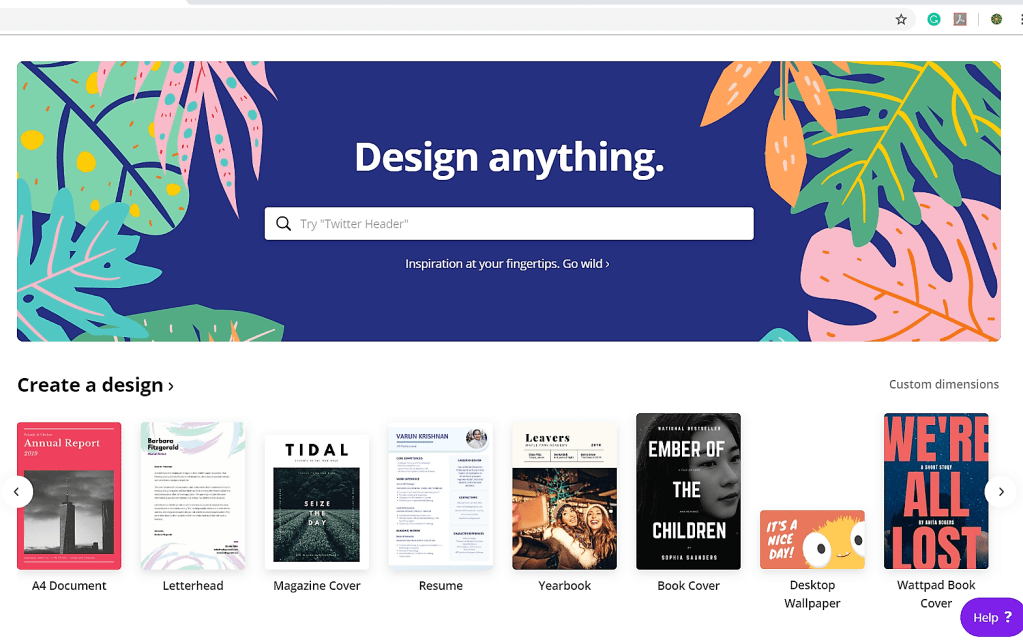
If you aren’t satisfied with the limited cover options offered by your book template or chosen publishing platform, you might want to make your own. Canva makes it easy to create a 1410 X 2250 pixel cover for your eBook. It even categories covers for you according to the genre. How cool is that?
Then scroll through the options and choose the type of book you are creating a cover for. So suppose I have a fiction book about three women who move to Mexico and live out their dreams. Obviously, it won’t work exactly how the template is, so I need to change it a little.
After you are satisfied with your cover, download it as a PDF Print form for the best image. This is what you will upload to the book template or publishing site.
If you are using Wattpad or need a 512 x 800 cover image, you can find that as on option on Canva as well. When you choose that option, you’ll get a selection of free and paid options, but they aren’t neatly classified. Canva Pro will give you even more options.
Make the changes you need and download the image. Since the image size is smaller, you may not need the high quality PDF version for a quality cover.
The eBook version of Exploring Traditional Herbal Remedies in Mexico is now available for download for those of you that purchased it as a pre-order. The eBook version is a fraction of the price of the paperback version, so you’re getting quite a deal!
I’m working on a three-book series about self-publishing this month, so look for that announcement in the (hopefully) near future.
One way to promote your book is to set up a giveaway, give your book to readers at events, or send it to subscribers of your newsletter. You can purchase several copies or just a single copy to gift someone.
You can purchase prepaid ebooks that can be redeemed by clicking a link or with a redemption code. To do this, go to the detail page for your title on Amazon.com. On the right, you’ll see the option to “Give as a Gift.” When you select that button, a new page will open for you to complete the order.
This gifting service is also available on Amazon.co.uk, Amazon.de, Amazon.fr, Amazon.it, and Amazon.es but only as a multi-copy transaction. The gift book must be purchased on the same site that the receiver will access it. So if you are sending a book to someone in Italy, make sure to purchase the gift copy through Amazon.it rather than the U.S. site.
If the person does not click the link to download the book within 60 days, you can request a refund or send the link to another recipient. Since this is a purchased book, you receive royalties on the title even though you bought it yourself. However, the royalties are only applied when the book is redeemed.
Gifting a great way to encourage Beta readers to leave a review for your book. Be aware though that if you are purchasing multiple copies at the same time, the recipients will only be able to leave non-Amazon Verified Purchase reviews. Therefore, purchase each Beta review copy individually.
Single copies gifting is only available on the Amazon.com U.S. site. The recipient of a single copy can return the gift within seven days of downloading as long as it hasn’t been opened on any device. He or she can also exchange the ebook for a gift card.























 C.E. Flores