Blog to Book Project — Using a Book Trailer to Market Your Self-Published Book

There’s no question that people are watching more videos these days. One billion hours of YouTube videos are watched per day. YouTube is the second most popular site on the internet these days (right after Google).

Facebook video is another up and coming option you should be aware of. Statistics show that 11 percent of all Facebook posts are videos and this platform generates 8 billion video views per day.

You can capitalize on all those video hours by creating your own book trailer. It’s a little out of the norm and will get more attention than a traditional book review or social media advertisement.

Now, the thing with a book trailer is you want it to be knock-their-socks-off good. If friends and family cringe when they watch it, well, perhaps it won’t be as successful as you’d like it to be. On the other hand, a professional and interesting book trailer demonstrates that you are a good storyteller across mediums, and prompts more interest in your book.

So here are some tips when designing a riveting book trailer.

  • Think about your typical reader and adapt the trailer to appeal to them specifically. If your book is a romance, then make your trailer romantic. If it is a mystery, then create a suspenseful trailer.
  • Hook your reader with a compelling video, not a summary of your book. You could focus on the problem the character in your book faces or the solution your non-fiction book provides the reader.
  • Keep it short. Aim for at least 30 seconds, but less than 2 minutes.
  • Use professional photos and graphics. There’s a lot of competition out there and you want your book trailer to stand out. Make sure to get permission to use images that are not your own.
  • Consider hiring an expert. Making a quality video, even a short one, incorporates many technical skills. If you aren’t skilled in video production, find someone to help you. Animated videos especially need the expertise of professionals.
  • If your book is nonfiction you could create an author video that demonstrates your expertise on the subject of your book. Consider your personal appearance if you do. Pay attention to what you are wearing, the background, and how well you articulate your words.
  • If you want to enact a scene from your book with real people, get actors to play the parts. Visit your local theater or advertise online. A professional voice actor is another possible way to get just the right tone for your book trailer.
  • Background music is a way to make text and images more memorable. Be sure to get permission to include it or use royalty-free music.
  • Make sure to include a call to action at the end of the trailer. Tell the viewer where your book is available for purchase.
  • Share the video everywhere! Add it to your author website, share it on social media, and upload it to YouTube. The more you share it, the more chance you’ll have to get the attention of potential readers.

There are several free or low-cost sites that can help you create a book trailer. Windows users can download Movie Maker or Photo Story. Mac computers have iMovie software already installed. You can use Powerpoint to create a presentation then export it as a video. Prezi also has a free version.

Assignment: Create a book trailer.

****

Click on the image for a preview!

Blog to Book Project — Types of Publishing

You may not be totally convinced that self-publishing is for you, and that’s ok. You have options. There are three main routes to publishing these days, traditional, self, and hybrid. Let’s take a few minutes to highlight the pros and cons of each.

Traditional Publishing

Traditional publishing refers to the process of being given a book deal by a publishing company. It typically involves submitting your manuscript to a number of agents or publishers and quite a few rejection letters. Once your book has been accepted, a contract is drawn up and signed by the author, the publisher, and the agent. A manuscript will go through several more rounds of editing before it is published. 

Some big-name publishing houses are Macmillan, HarperCollins, Penguin Random House, and Simon & Schuster.

Pros:

  • Validation. Your book was deemed worthy to be published by one of the big guns in publishing. 
  • Getting your book into brick and mortar bookstores is initially easier. 
  • You’ll have a team of editors, cover designers, and formatters to work with.
  • No upfront financial costs and sometimes a royalty advance.

Cons:

  • Slow process. It could take years to get an agent. Then it could take more years before your book is launched.
  • You lose creative control over your title, cover, and marketing. 
  • Royalty is reduced by expenses incurred, so it could be as low as 7% of total sales.
  • Marketing may be inadequate to generate sales or not be part of the package deal at all.

Self-Publishing

There are all sorts of self-publishing platforms out there these days, including Amazon, Barnes & Noble, Lulu, Kobo, and Wattpad among others. When you self-publish your book, you are basically asking a publisher to print your book and sometimes distribute it. You retain all copyrights and ISBN numbers as well as any books you have printed and purchased through the publisher. 

You might do better as a self-published author if you are producing books on niche topics, highly specific themes, rather than general interest works. Remember, just because there are not so many hoops to jump through, doesn’t mean you should aim for the creation of the best book possible. That means editing, proofreading, checking for formatting errors, and so on. 

Pros:

  • You are the final say in your book’s content, design, and marketing strategy. 
  • It’s faster to get from finished manuscript to market and get paid. 
  • You’ll earn higher royalties, usually 35% to 70% of each sale.
  • You can sell your book in other countries while retaining the rights to your work.  
  • If you do well at self-publishing, agents might contact you for a traditional book contract.

Cons:

  • You have to do everything yourself, or hire someone to edit, format, design a cover, and market your book. 
  • There’s still a stigma to self-published work. Writers are often not considered “real” authors until they get a contract. 
  • You’ll need to budget for editing, cover design, and marketing expenses. 
  • It’s more difficult to get your book into brick and mortar bookstores. 

Hybrid Publishing

If you go the hybrid publishing route, you can hire a publisher and keep your copyrights. The publisher will publish your book with their company imprint as well as providing a professional cover and do the editing. Some companies will market your book, while others leave that aspect up to you. It’s important to understand what services you will be receiving for your fee. 

Hybrid Publishing companies include 3rd Coast Books, Page Two Strategies, Greenleaf Book Group, TCK Publishing, Plum Bay Publishing, Rebel Press, and Unbound to name a few.

Pros:

  • The publishing company provides professional printing, layout, cover design, and editing.
  • You retain copyrights.
  • Royalties are higher than standard. 
  • Great for niche books.

Cons:

  • Fees to the publishing company can be substantial. 
  • You are responsible for marketing.
  • It’s more difficult to get your book into brick and mortar bookstores. 
  • Sometimes it’s hard to tell the difference between a hybrid publisher and a vanity press.

There you have the three types of publishing available these days. Knowing a little about each can help you better decide which route to authorship you’d like to take.

***

Self-Publishing Guides

Looking for some help self-publishing? Check out these guidebooks written just for you!

Click on the covers for previews!

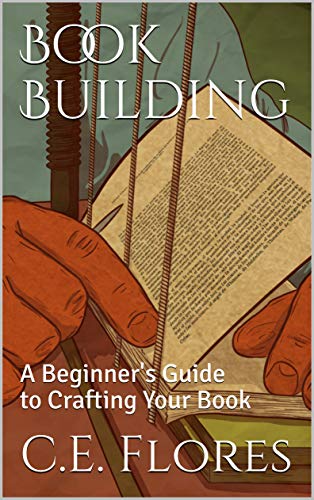
Book Building: A Beginner’s Guide to Crafting Your Book can help you properly organize your manuscript.

Book It: A Beginner’s Guide to Self-Publishing and Marking on Amazon will help you navigate the publishing process.

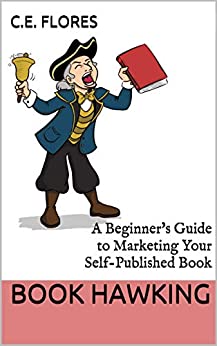
Book Hawking: A Beginner’s Guide to Marketing Your Self-Published Book is full of additional ways you can get your book into the hands of readers whether you’ve self-published or gone the traditional publishing route.

All three books are FREE today, so be quick and get your copies!

Blog to Book Project –Author Newsletter

An author newsletter is also an excellent way to market your book. However, don’t be book self-promoting every single time. So if you aren’t selling, what are you writing about in your newsletter?

You should write content that would be interesting to your readers. Providing useful, informative, or entertaining particulars increase the chance that your readers will peruse, read, and maybe even look forward to your periodic missives.

If you are a middle-ages romance novelist, perhaps you could share some historical tidbits you discovered while researching your soon to be released Scottish highland book. If you write about homesteading, how-to articles are always well-received.

Get your readers involved with polls or surveys. What do they want to read about? Which cover is more appealing? What would they do if….?

Share your upcoming promotions. If you had a book signing recently, write about it. Include pictures and links to where newsletter subscribers can get a signed copy for themselves. If you do a podcast, include a link. If you have a Q&A session on Facebook Live coming up, invite them to join you.

Tell an entertaining or embarrassing personal story. Talk about how your cat Fluffy has been helping or hindering you as you write your soon-to-be-released book. Give readers your writing playlist, favorite inspirational quotes, or writer’s block brownie recipe. Bonus points if you can tie in your next book.

You could include articles written from the perspective of your book characters. Or tie in the holidays to an upcoming or past book. Remember when Janie broke Paul’s heart right before Christmas in Jingle Bells, Chrismas Sucks–A Holiday Romance? Well, this Christmas, here’s how you can avoid family drama…

A newsletter helps you make a personal connection with your readers. Those that sign up are already interested in your books, so why not capitalize on it? Unlike Facebook or Twitter, you own the newsletter. You don’t have to worry about changing algorithms affecting the visibility of your posts or having the platform disappear completely. Remember Google +?

Mailchimp has free plans, pay-as-you-go plans, as well as several other monthly plans. With any plan, you can use ready-made templates to drag and drop your content, links, and images. The free plan allows you to contact up to 2,000 subscribers and send up to 12,000 emails per month. Because Mailchimp integrates with Twitter, Facebook, and WordPress, readers can sign up for your newsletter through these platforms as well.

Another email option is Mailerlite. The free plan will let you contact up to 1,000 subscribers and send 12,000 emails per month.

Remember not to spam your subscribers and to include an unsubscribe option at the bottom of the newsletter.

Post a link to your newsletter sign-up page on your Twitter, Facebook, and website. Offer a freebie in exchange for their opt-in. You could offer sample chapters, novellas, checklists, writing tips and tricks, or something else that you think your readers might enjoy.

The key to a successful newsletter is offering content that has value, such as useful information, personal connection, free/bargain books, and so on. If you don’t think you are up to the task, then don’t try to force yourself to create a newsletter. Focus on other methods of social media publicity instead.

***

ebook cover

Blog to Book Project — Creating a Lockscreen Ad Campaign on Amazon

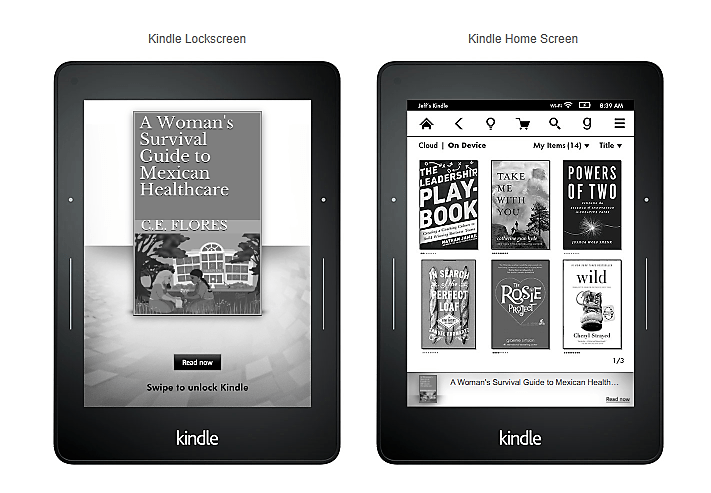
Lockscreen ads appear on Kindle and Kindle Fire devices of people that have read a book related to one of your target words in the past. Lockscreen ads are only available for eBook promotions, not paperback. 

They are charged on a cost-per-click. So if no one clicks on your ad, you aren’t charged for it. When readers do click on your ad, they are taken to your eBook’s detail page on Amazon. These types of ads are only available on Amazon.com.

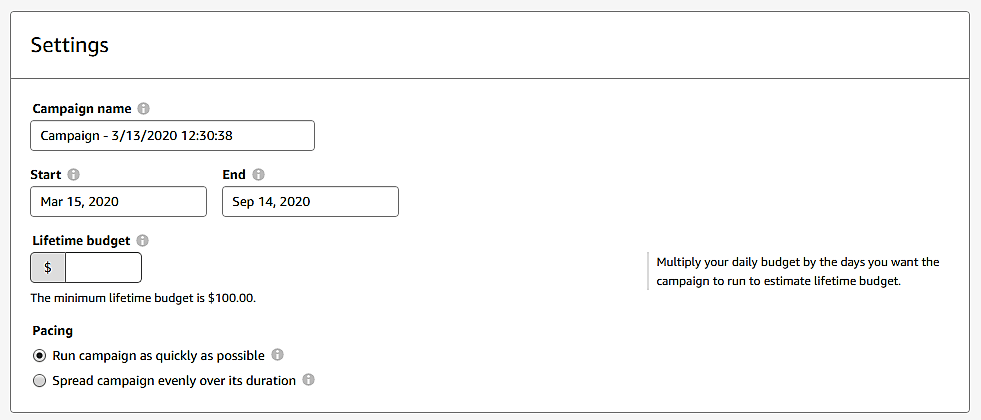
After choosing the Lockscreen ad option, you’ll be taken to the page to set up your ad campaign. Here, you will enter a campaign name to help you keep track of different ads. It’s not information that is visible in the ad. It is for your organizational use only. 

Then choose a start and end date for the ad campaign. The start day will always be two days from the date you submit the campaign to Amazon for review. Amazon recommends you run your ad campaign for at least four weeks. 

To figure out what your lifetime budget is, multiply the number of days you want the ad to run by your daily budget. The minimum lifetime budget is $100, so you’ll have to plan to spend at least that much for each ad campaign. Remember, if no one clicks on your ad, you aren’t charged with this sort of campaign, so that $100 could stretch out quite a while. 

If your goal is to generate clicks quickly, choose the Run campaign as quickly as possible option. If your goal is to make the most of the time you have decided to run the campaign, then select Spread campaign evenly over its duration.

Products

Under products, you’ll see all your current eBooks. Choose the eBook you want to advertise in this ad campaign.

Interest Targeting

In this section, you will choose genres or interests that you want to target with your ad. You can choose as many as you like. Under each category, you can target all or select only the most relevant.

Bidding

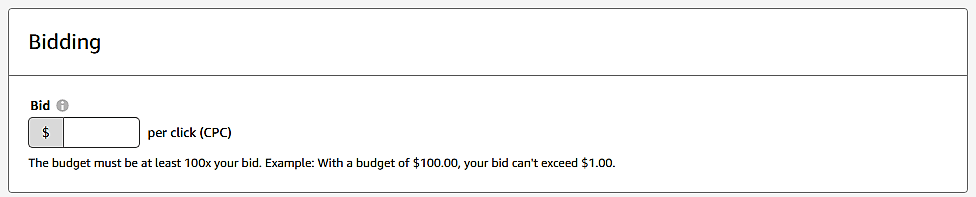
Your budget must be 100 times your bid per click. So if you have entered a lifetime budget of $100, your bid per click can not be more than $1.00.

Creative

You can enter a custom text to entice potential readers. It should be at least 50 characters and no more than 150 characters. Below this you can see a preview of what your ad will look like on the Kindle lockscreen and the Kindle home screen.

Submit for Review

You will not be able to edit any part of your ad campaign once you have submitted it for review, so check everything carefully before you do so. Amazon will email you once it has been approved or if you need to make changes. This process can take up to three business days. 

If your eBook ad is rejected, review Amazon’s book ad policies. Your cover might be too racy for all audiences or your book subject might not be considered appropriate for some groups of people.

Assignment: Create an Amazon ad campaign.

***
Blog to Book Project — Creating a Sponsored Products Ad Campaign on Amazon

Once you set up your ad account, you’ll see that there are two options to choose from: Sponsored products and Lockscreen Ads. In this post, we’ll discuss sponsored products campaigns.

Select the corresponding ad type. You’ll be taken to a page to enter the details. Create a campaign name to help you keep track of different ads. It’s not information that is visible in the ad. It is for your organizational use only. 

Then choose a start and end date for the ad campaign. If you don’t designate an end day, it will continue indefinitely. If you want to extend the ad campaign past the end date, you can change the end date anytime before the date you had originally chosen.

Decide on a daily budget. This is the amount you are willing to spend on ads during a 24-hour period. 

Next, you’ll need to determine whether you want to go with automatic or manual keyword marketing. If you have no experience at this, you’d do best to let Amazon choose the keywords for your book. Once you have done a few ad campaigns, you can refine the keyword targeting to best reach your potential readers. 

Campaign Bidding Strategy

Now you’ll need to decide how to create a range of bid prices. Remember, Amazon will always choose the highest bid within the category to display since it will make them the most money, so this step is important. 

Dynamic bids change depending on the likelihood of a sale. So if someone has searched for books about holidays in Mexico and your book is about traveling in Mexico, it’s not a perfect keyword match. Amazon will determine how likely the person searching is to be interested in your book based on complicated algorithms. 

If you choose Dynamic bids–down only and Amazon determines that the searcher isn’t likely to be interested in your book about traveling in Mexico, then they will charge you less if the person does click on the ad. 

If you go with Dynamic bids–up and down, then Amazon will charge you more when it’s a perfect keyword match than if it’s only a partial match. Therefore, if the person is searching for books about traveling in Mexico, then Amazon will charge you the full price. If the person is looking for a book about holidays in Mexico, then they won’t, since it’s not a sure thing. 

Fixed bids take the fluctuation out of the equation. You’ll be charged the same price no matter the likelihood of purchase according to the algorithms. 

Adjust bid by placement will give you more opportunities to have your book prominently displayed either at the top of the page or on product pages. Remember, it’s a bidding process, so the higher your bid, the more likely Amazon will choose your ad to display over someone else’s ad. Of course, that means you’ll pay more for that privilege. 

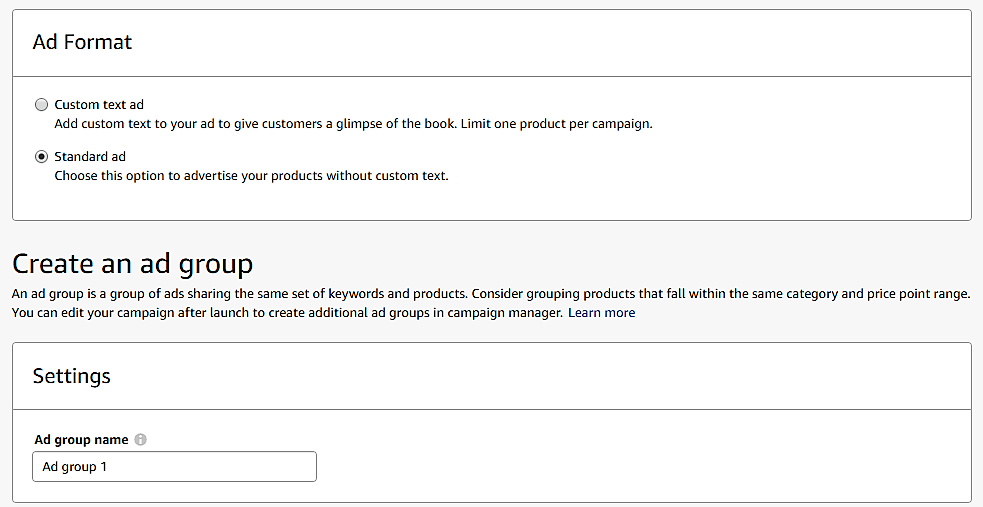
Ad Format

You can either use a standard ad format or a customized one. Custom text is only available on Amazon.com right now. However, if you are using that marketplace to run your ad campaign, you should use the opportunity to hook readers with creative commentary. 

If you select the standard ad format you can create an ad group. This allows you to advertise similar books under the same bid parameters and keywords you’ve already chosen. 

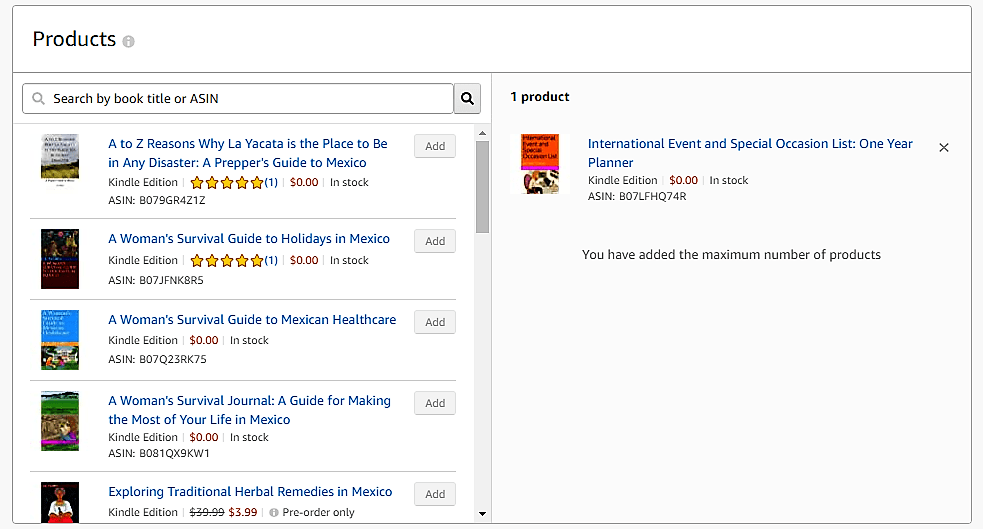
Products

If you have reached the ad campaign setup page by choosing Promote and Advertise from your KDP If you have reached the ad campaign setup page by choosing the Promote and Advertise option from your KDP bookshelf, then your product is already selected. If not, choose one from your product list.

Automatic Targeting

You can choose the default bid or set the bids by targeting groups. Amazon helpfully supplies a suggested bid for your book as well.

When you set bids by targeting groups, you can change your bid amount depending on if the keyword search is a close or loose match, a word substitute or a complimentary term. 

So if your keyword is “holiday celebrations in Mexico” a close match would be “holidays” or “Mexico” whereas a loose match might be “Latin America” or “customs.” A word substitute would be “customs in Mexico” where the word “holiday” is used instead of the term “customs.” “Customs in Latin American” might be a complement keyword phrase. It isn’t exactly what the person was looking for, but your book falls into the general category. 

Negative Keyword Targeting

Negative keywords allow you to define who sees your ad based on their search parameters. You can use it to make sure your ad isn’t shown for a particular term because it is irrelevant. 

For example, if your book is about Mexico, a negative keyword you could set up is “New Mexico” because people looking for New Mexico are not your target readers, typically.  Doing this saves you money since your ad won’t be displayed for New Mexico searches. 

If this is your first ad, you might not know what terms to include as negative keywords. You can get a general idea from negative keyword generators online like WordStream. It isn’t absolutely required that you list negative keywords, so don’t sweat it too much. 

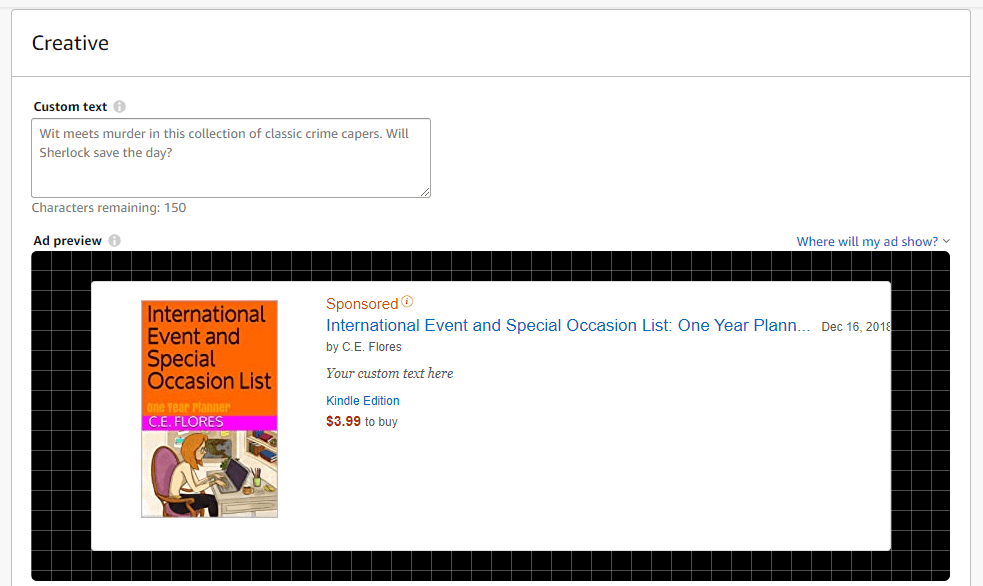
Creative

Under Creative you’ll see a preview of your ad. You can insert custom text to hook the potential reader if you like. 

Submit for Review

If you have already entered your credit card information for billing, you can submit your ad campaign for review. Amazon will then determine if your book meets the requirements and standards set out in the policy guide. If it is, you’ll be billed monthly for the total number of showings during that time period.

Assignment: Create an Amazon ad campaign.

***

Blog to Book Project –Amazon Ad Campaigns

Amazon offers a way to reach more potential readers through Amazon Advertising. These ads are run on a cost-per-click auction based model. That means Amazon holds a real-time auction every time someone does a search to determine which ads will appear based on relevancy. The cost-per-click, your “bid” is the amount you choose to pay if someone actually clicks on your ad.

Amazon will always choose the highest bid within the category to display since it will make them the most money. So suppose you have a book about canaries that you want more people to be aware of. Amazon suggests that you bid $0.70 but the bid range for that category is ($0.40 – $1.40). You decide to go with the custom bid of $0.70. However, someone else has a book about canaries and their bid is $1.40. Amazon will choose to show that bid more often than yours when the criteria is met in a search. 

Your book cover and book content have to meet certain requirements to even be considered. To see the complete list of prohibitive cover images and book themes, you’ll need to read through Amazon’s book ad policies.  

Currently, you can run Sponsored ads on Amazon in the US, UK, Germany, France, Italy, and Spain. Lockscreen ads are only available for the US. 

You can advertise books written in languages other than English, but all language in the ad must match the language of the Amazon site where the ad is running. For example, if you want to advertise a book written in Japanese on Amazon.com, the ad must be in English. Also, book titles must clearly state if the book isn’t in the language of the Amazon site where the ad is running.

If potential readers click on your ad, they’ll be taken to the detail page of your book on Amazon. Therefore, before you set up an ad campaign, you should make sure that the layout is eye catching and the book blurb is interesting. Check the visual appeal of your book cover, too.

Creating an Ad Account

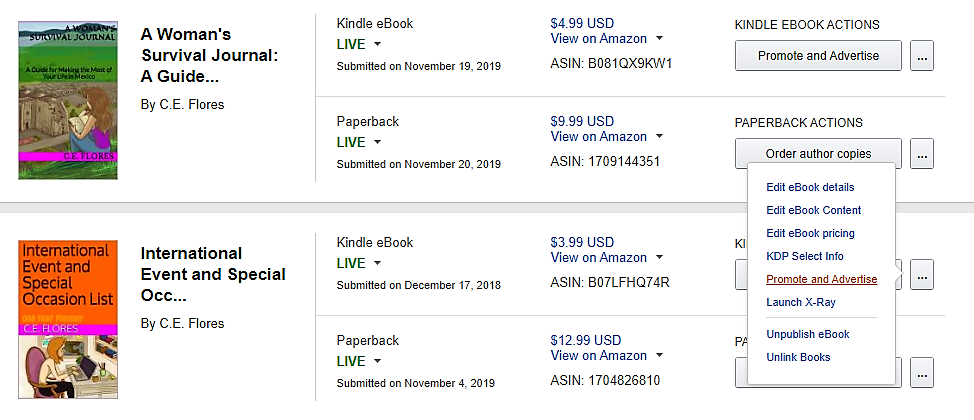
To begin, go to your KDP bookshelf and select a book you want to run a campaign for. Choose Promote and Advertise under the ellipses.

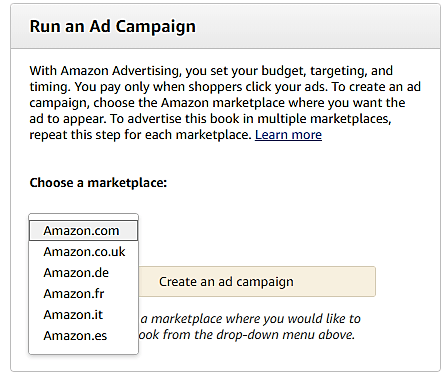
Then you’ll want to look at the Run an Ad Campaign section. Choose a marketplace from the available options. 

You’ll be taken to a screen that forces you to accept Amazon’s policies before continuing.

Once you do so, you’ll see that there are two options to choose from: Sponsored products and Lockscreen Ads. 

Sponsored products are those that you see across the top after you search for a particular book topic. Lockscreen ads appear on Kindle and Kindle Fire devices of people that have read a book related to one of your target words in the past. Lockscreen ads are only available for eBook promotions, not paperback.  We will discuss these individually in future posts.

Assignment: Set up an Amazon Ad Account

***

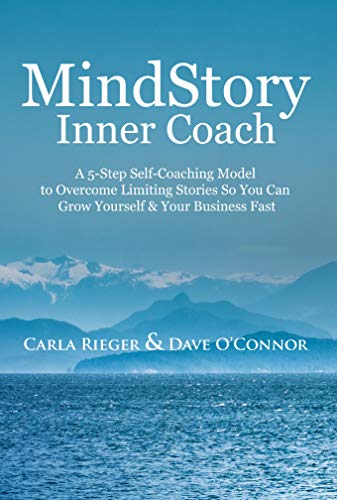
MindStory Inner Coach: Overcome Your Past Stories so You and Your Business Can Thrive by Carla Rieger and Dave O’Connor

mindstory cover

I had some problems initially finding the motivation to read Mind Story Inner Coach by Carla Rieger and Dave O’Connor. The writing in the introduction and first few chapters seem stilted and full of cliches. The personal experiences were wordy rather than concise storytelling. For example, “I was starting from scratch all over again” just seems full of tautology.

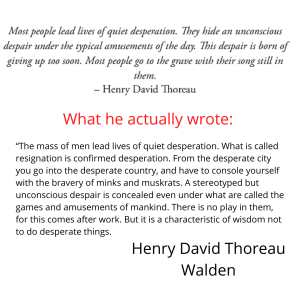
Then there was the misquote from Henry David Thoreau at the beginning of chapter two. If the authors were paraphrasing Thoreau’s words from Walden, then that should be made clear because the quote that is there is not found in any of Thoreau’s works.

Despite these stumbling blocks in my reading, I was interested in the theme and persevered. I’m happy to report that it was worth it! The stories were more concise and less wordy, although there continued to be many cliches, after the first few chapters.

The book has five sections with three chapters in each section. Each of the sections detailed the AVARA Model, one for each letter in the acronym. Then each chapter highlighted a subsection of the main categories which included personal experiences from both authors. Additionally, it has self-reflection questions under the heading Homeplay to help the reader apply the information and recommendations found in each chapter.

My favorite section was about identifying and changing our mind stories. It’s true that sometimes we set ourselves up for failure because of the beliefs we’ve internalized. As discussed in this section, discovering our core values is also essential to success, both in business and personal endeavors. The activities designed to help the reader pinpoint the mind stories and core values were excellent. The Commonly Asked Questions section was very helpful in responding to doubts that may arise as the reader works through the AVARA Model.

If you are looking for some assistance in refining your business goals and making informed decisions that align with your core values as you move forward, then Mind Story Inner Coach by Carla Rieger and Dave O’Connor is the book for you.

four star

I received an ARC from Reedsy Discovery. You can read my review here.

Creating an eBook Cover with Canva

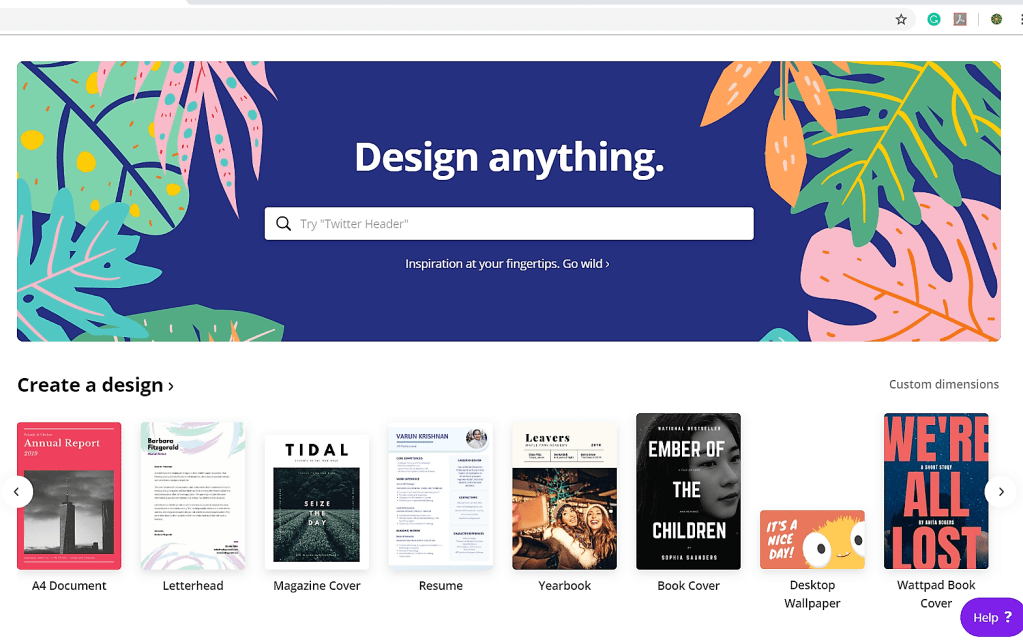
If you aren’t satisfied with the limited cover options offered by your book template or chosen publishing platform, you might want to make your own. Canva makes it easy to create a 1410 X 2250 pixel cover for your eBook. It even categories covers for you according to the genre. How cool is that?

Go to Canva and choose the book cover icon.

Then scroll through the options and choose the type of book you are creating a cover for. So suppose I have a fiction book about three women who move to Mexico and live out their dreams. Obviously, it won’t work exactly how the template is, so I need to change it a little. 

After you are satisfied with your cover, download it as a PDF Print form for the best image. This is what you will upload to the book template or publishing site. 

If you are using Wattpad or need a 512 x 800 cover image, you can find that as on option on Canva as well. When you choose that option, you’ll get a selection of free and paid options, but they aren’t neatly classified. Canva Pro will give you even more options.

Make the changes you need and download the image. Since the image size is smaller, you may not need the high quality PDF version for a quality cover.

Assignment: Make your eBook cover with Canva.