Blog to Book Project — Free Book Promotion

Make sure to scroll down to see which eBook is FREE for you to download from Amazon today!

A great way to get reviews is to offer your book free every so often. When your title is enrolled in KDP Select, you can give your book away for up to 5 days every 90-day term. If you have already done a Kindle Countdown Deal during a period of enrollment, your book won’t be eligible for a Free Book Promotion.

To set up a free book promotion click on the Promote and Advertise button next to the title on your KDP Bookshelf.

On the Promote your book on Amazon page, make sure the Free Book Promotion is selected and click on the yellow Create a new Free Book Promotion button.

Choose a start and end date. You can choose all five days at once, or run multiple free book promotions during the 90-day period. Once the dates are entered, select the yellow Save Changes button. 

You can edit or delete a free promotion at any time, including during an ongoing promotional period. While the book is free, it won’t be included in the Kindle Owners’ Lending Library (KOLL). You also don’t receive any royalties for any free books that are purchased during the promotional period. 

While your book is free, it is eligible for ranking on the Top 100 Free page in the Kindle Store. Once the promotional period ends, it reverts back to ranking on the Top 100 Paid page.  

Don’t forget to blast your social media networks with the news! Everybody loves FREE books!

Assignment: Set up a Free Book Promotion.

I’ve set up a free book promotion for my latest that you can pick up for FREE until April 8, 2020. A Woman’s Survival Guide to Disasters in Rural Mexico eBook version is FREE–so go on and pick it up!

Blog to Book Project — Kindle eBook Pre-Order

In order to start some hype about your ebook, you can set it up as a pre-order book after you have published your print version. Pre-orders count towards sales ranking even before your book is released.

Pre-orders are not available at Amazon.in yet, but you can set your book up for pre-order at any other Amazon Kindle Store. Customers can order it anytime up to the release day. Once it’s released, they will receive their copy.  

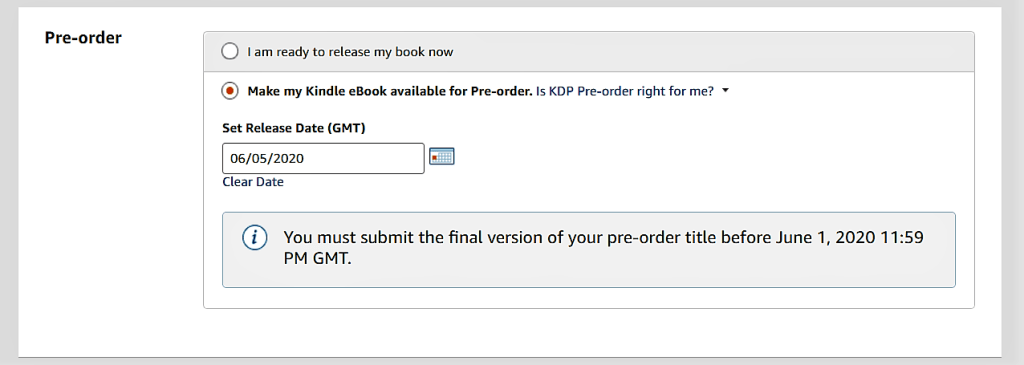
To create a pre-order, set it up as you would any other KDP ebook. When you get to the pre-order section, choose “Make my Kindle eBook available for Pre-order.” and choose a release date. You’ll get a message telling you that you need to upload the final draft a few days before that release date. Save and continue.

Under the Manuscript heading, you are given the option to upload your manuscript now or wait until a few days before the release date to upload it.

Continue through the setup process. On the final page, you’ll see the yellow button “Submit for Pre-Order” instead of the normal publish option.

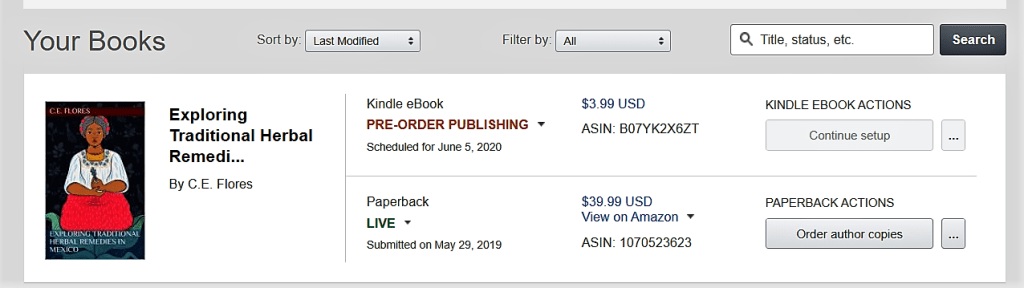
Once you submit your manuscript, the detail on your bookshelf for that book will say “Pre-Order in Review.”  While Amazon is setting up the detail page for your pre-order book, the notification will say “Pre-Order Publishing.”

Once it is live, you’ll receive an email where you can check out the detail page on Amazon for this title. 

If you haven’t submitted a manuscript, there will be a timer on the setup page that lets you know how long you have to submit your file so that it will be delivered to customers on time. If you don’t upload a manuscript before that date, the pre-order will be canceled and you can’t set up any other pre-orders for the period of one year. You won’t be able to make any changes to the manuscript after the submission deadline until after the release date. 

You can keep track of pre-orders on your reports page. The report will include pre-ordered ebooks, cancellations and net pre-order units. The sales information will not appear in the royalty reports until after the book is delivered to customers. 

You can change the release date if you need to. If you move it up, you must submit the republish your manuscript. Customers who have already pre-ordered your book will get the book earlier.

You can delay the book’s release once up to 30 days before the submission deadline. If you delay the book a second time, you won’t be able to create another pre-order for a year. If your book is delayed, customers who have already ordered your book will receive an email to that effect. 

You can also cancel a pre-order by unpublishing it from the bookshelf on KDP. If you cancel though, you won’t be able to set up another pre-order for one year. 

Assignment: Get your ebook ready for pre-order.

Blog to Book Project — Kindle Countdown Deals

The Kindle Countdown Deal is available to books enrolled in KDP Select. It is a sale on your book that you can run on Amazon.com and Amazon.co.uk.  When your book is part of a countdown deal, potential buyers can see the regular price and the promotional price on the detail page along with a countdown clock.

You’ll receive your regular royalty rate for each sale during the promotion. Furthermore, your book will be listed on the Kindle Countdown Deal page.

To set up a Kindle Countdown Deal, select the Promote and Advertise button by your book in your KDP Bookshelf. 

That will take you to a page entitled “Promote your book on Amazon.” On this page, make sure the Kindle Countdown Deal option is selected and click on the yellow Create a new Kindle Countdown Deal button. 

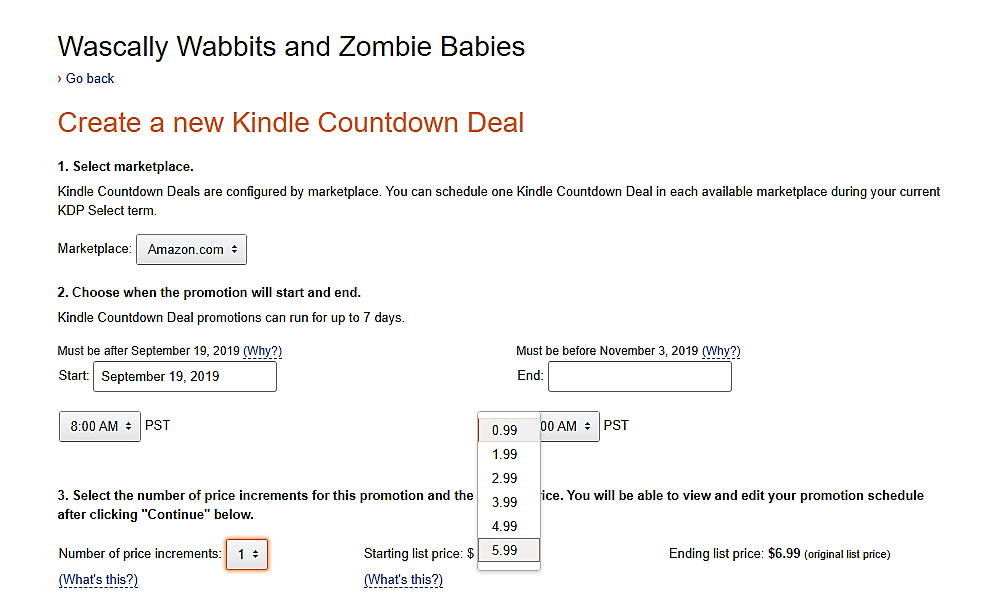
On the following page called “Create a new Kindle Countdown Deal” first choose whether you wish to run your sale on Amazon or Amazon UK. Then choose what 7-day period you want to run the sale. You can choose to run the deal for fewer days, but you only get one countdown deal per each 90-day enrollment period, so you might as well use the maximum number of days. 

Decide how many increments you want the sale price to have, from one to five. Then decide on the starting price of your book from .99 to $1 less than the full price. 

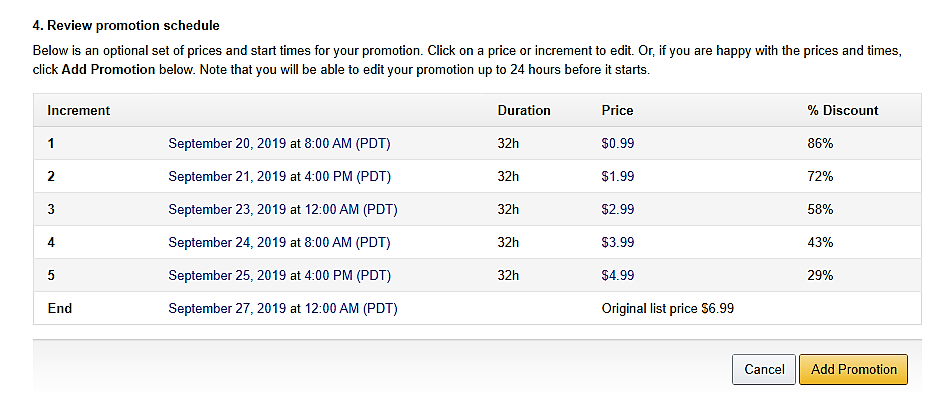
When you continue, you will see the proposed promotional schedule including date, duration of that price point, price and the discount percentage. You can edit as you wish before confirming by selecting the yellow Add Promotion button at the bottom of the page. 

In order to qualify for this sale, the digital price of your book can not have changed 30 days prior to the sale or 14 days after. The book must have been enrolled in KDP select for at least 30 days.

The book can’t have had a free promotion during the same KDP Select term. You can choose either one type of promotion or the other, not both. If your book is not exclusive to KDP Select and Amazon finds out about it, you lose your KDP privileges and any promotions are cancelled. You also can’t cancel the promotion once it has begun. 

Make sure to advertise your Kindle Countdown Deal on all your social media accounts!

Assignment: Set up a Kindle Countdown Deal.

Blog to Book Project — Cover Design

You have an incredible opportunity to convince someone to buy your book if you have the right cover. If it is bland or if it doesn’t accurately represent the contents of your book, then prospective readers will move on. 

If you have the artistic ability, then, by all means, take a crack at designing your own cover. I am not fortunate enough to have that talent, so I ask my artist friend, Clau Guzes, to create images that I can use for my cover using Cover Create at KDP and in my books.

If you don’t have an artistic friend, then you can search for one on a variety of freelance platforms. Upwork, BookDesignTemplates, Reedsy, 99designs, and Fiverr all have oodles of designers in every price range and ability. 

Do-it-yourself options include Canva, Pixlr, DIYBookCovers, and GIMP.

Whichever option you choose, your cover should entice readers to pick up your book and page through it, whether literally or virtually, depending on the format. 

Look at other book covers written by other authors in your niche or genre. Are there similarities in the cover design or image choice? You’ll want to mimic them. 

When you’ve narrowed it down, you could make a poll and ask your readers which they prefer. Polls create an excellent opportunity for you to connect with your fans.

The image and design that you ultimately go with should portray the main idea of your book. Take a look at these cover designs gathered by Reedsy for some cover design inspiration. 

Assignment: Choose or design an image you want to use on your cover.

Blog to Book Project — Book Launch

Back in the day of traditional publishing, a successful book launch was essential for an author. The publicity surrounding the launch of a book would not be funded by the publishing company again if the initial launch flopped. Books that were not sold within a period of time would be bundled and discarded. 

With the rise of self-publishing, and print-on-demand services, the question of what to do with unsold books is no longer an issue. Book files can slumber peacefully in the Amazon cloud until they are awakened and downloaded. Although book launches are still great marketing strategies, authors have shifted their attention to year-round publicity and the production of new works rather than putting all their eggs in one basket in a lavish book launch. 

Some authors hope that the added noteriarty generated in a book launch will propel their book to the best seller list on Amazon, which in turn ensures Amazon will do more to promote the book, leading to even more book sales. A book launch certainly can do that, but chances are low. So don’t get too discouraged if your book doesn’t skyrocket to the top during your book launch. Remember, slow and steady wins the race.

By definition, a book launch is the combined activities surrounding the release date of your book. Most of these activities will center around marketing and can occur before or after the official day the book is available to the public. 

Pre-release

Before your book is out there, you might do some interviews, podcasts or guest posts on other sites. While the topics discussed may not be directly related to your book, odds are that you’ll have ample time to mention and encourage readers or listeners to be on the lookout for your new tome. 

Starting the hype on your own author website and social media should also be parts of the pre-release book launch activities. Add a countdown graphic. Talk about how excited you are. Mix in a few testimonials from Beta readers. Make your readers want to get their hands on your book the moment it is ready.

Release Day

Host a book party! Hang out with your friends with signed author copies of your books and celebrate your accomplishment. It’s not every day that you publish a book! Consider a themed party. Have guests come as characters in your novel. Make sure to get plenty of pictures that you will then use in your next post on your author website and upload to social media. 

If you aren’t able to host a live book party, then consider a virtual one. Go live on Facebook at a specific time. Let fans know you’ll be available to answer questions. Offer book giveaways for those who drop by or share your information. 

Post-release 

The period after your book has been released is no time to rest on your laurels. Get busy marketing. Do more interviews, podcasts and guest blogger posts. Set up a Countdown Deal or Free Book giveaway and let EVERYONE know about it. 

Begin to create an author brand. What genres will you be known for? What can readers expect from your future books? What is the next book about? This is the time to start generating interest for your following publication. Set up an option for pre-orders or release day notifications. 

Consider a book signing tour to keep the momentum going. Of course, since you are self-publishing, then you’ll need to foot the bill for this yourself, so it may not be practical. 

A better alternative might be to ask local libraries if they’d like to have a copy of your book for their shelves. Announce your book’s library inclusion from the rooftops of social media. 

Keep adding interesting and relevant information to your author’s website, interspersed with reminders that your book is available for purchase. Get busy on that next release and repeat the cycle. 

Assignment: Plan your book launch activities. 
Blog to Book Project — Amazon Affiliates Program

I’ve been an Amazon Affiliate since I started blogging. I don’t make oodles of money, but I do make a little bit. If you haven’t already signed up, then you should do so. You have set up your blog and started creating a social media presence right?

Basically, you can get a tracking code for any product page on Amazon. If someone clicks on your link, Amazon knows about it. You may be eligible for a commission on anything they purchase after they click that link, even if it wasn’t the product that originally led them to Amazon. 

There are all sorts of tools designed to drive traffic from your link to Amazon that the company provides. You’ll need to decide which will work best for you. 

However, as an author, being an Amazon Affiliate means that you get a small commission on your own book in addition to royalties if someone buys your book using your affiliate link. A bit of double-dipping, shall we say! 

Being an Amazon Affiliate also provides you access to the Kindle Instant Preview links which we will talk about in a bit. Plus, when you offer your Free Book Promotion, if readers downloading your book stay on Amazon and purchase something else, you’ll get a commission there too. 

The important thing is not to abuse your affiliate status. Amazon does not allow affiliate links in ebooks sold on Amazon, so make sure your book doesn’t have any. You also must not click on your own links to generate commissions. Amazon will boot you out of their program if they catch you. 

And you’ll need to disclose your affiliate relationship with Amazon in posts, newsletters and other places you may insert a link. I use an image on my blog’s sidebar that is visible on whatever page is being viewed. 

The easiest way to get affiliate links for your book is to go to the book’s detail page on Amazon. You’ll have three options, text, image and text plus image. Feel free to try them all and see what gives you the best results. 

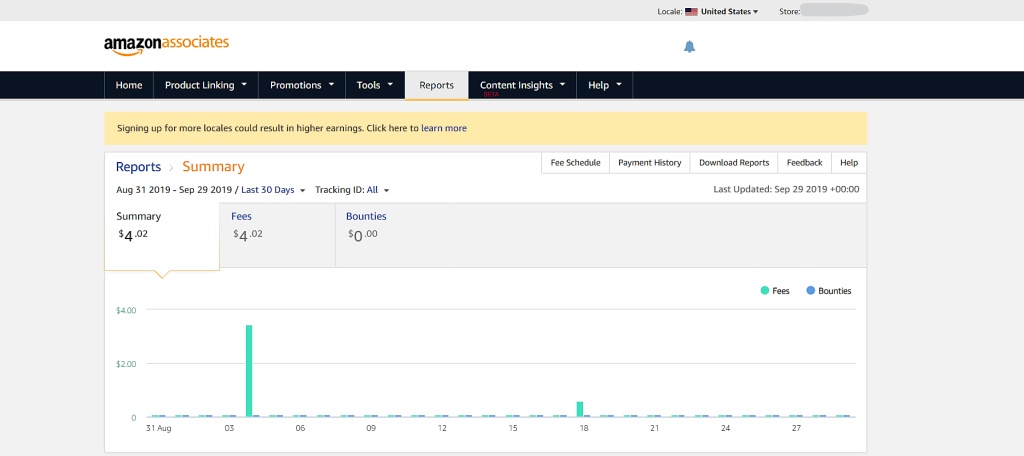
You can keep track of clicks and commissions earned from the Earnings section on your Amazon Associates SiteStrip that will now appear at the top of any page you visit on Amazon. 

You can also see how many ebooks your links have sold, whether yours or another author you are promoting. There’s no need to be stingy with Amazon Affiliate links. The more the merrier. 

Amazon pays out commissions earned every two months. You need to meet a minimum amount, otherwise, the amount just rolls over until you meet the minimum. If you choose to get paid by direct deposit or Amazon gift card, you’ll get paid after your commissions earned a total of $10. If you want to receive a check, then you’ll need to wait until you rack up $100.

So that’s a brief overview of the benefits of becoming an Amazon Affiliate as an author.

Assignment: Sign up to be an Amazon Affiliate

Blog to Book Project — Twitter for Authors

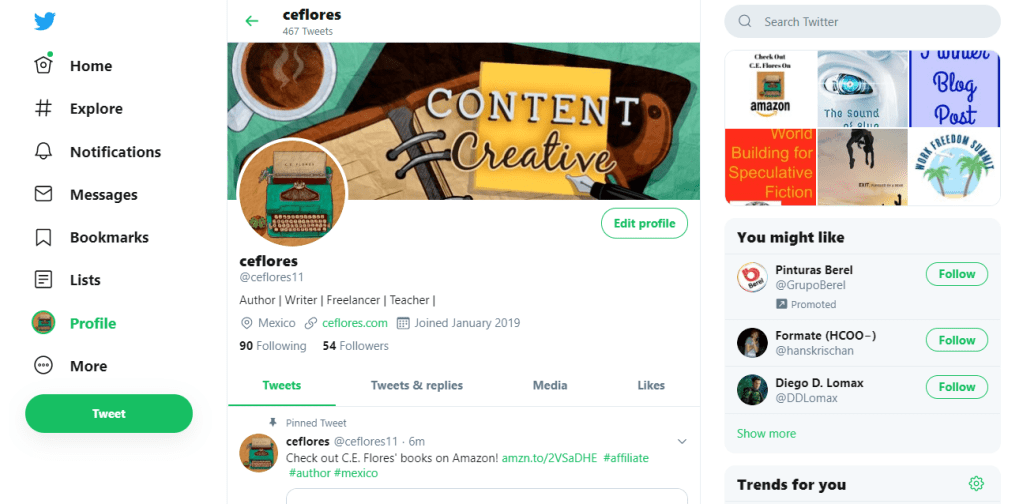
Twitter is another great place to advertise. When you sign up for Twitter you get to choose your user name. You can choose your own name, a pen name or something really cool.  If the name you want to use is taken, which happens a lot, come up with something else. 

Fill out the profile information completely. Make sure to include a link to your author website. Add your profile picture. I use my page icon instead of my author picture, but that’s just me. If you are having difficulty deciding what to include on your profile, look at other authors in your genre and see what they have done. 

Take some time every week or so to find other writers, book reviewers, and interesting people to follow. Try to find people that are prominent in your particulate niche. 

Tweet a variety of images, posts, links, book reviews, author interviews, news articles along with a few self-promotional bits. When your stuff gets retweets or comments, publicly thank them. It’s good form. 

Use hashtags generously.  #bookreview #author #freebookpromo #freekindle 

The lists option is a nice way to organize the people you follow. They get a notification that you put them on a list and are often flattered enough to follow you back. 

Twitter is a rapid-fire social media site. Tweet copiously!

Assignment: Set up your Twitter account and begin tweeting!

Blog to Book Project — Proof Copies

Proof copies are great to send Beta readers, proofreaders, copy editors or to do a final check yourself. A proof copy is what your book would look like before it gets the final quality review at Amazon. 

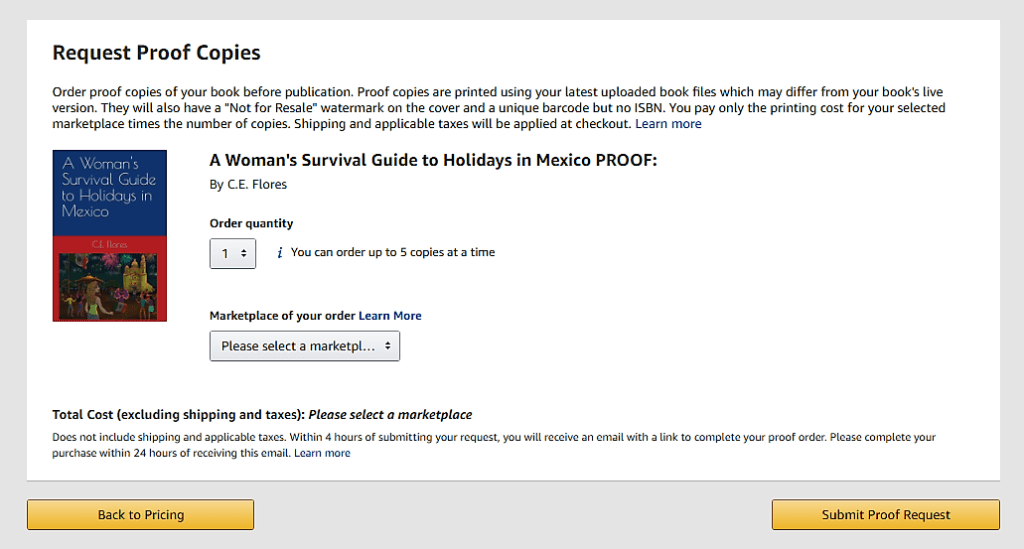
You can only order proof copies when your book is in the draft category. You will get the opportunity to order proofs when you reach the Paperback Rights & Pricing tab in the uploading process. Click on the link in the box above the yellow Publish Your Paperback Book button that says “Request Printed Proofs of this book that you can order from the Amazon cart.” 

Clicking on that link will take you to a page where you can place your order. You can order up to five copies at a time. You can ship to multiple addresses by placing separate orders.

After you order your proof, you can publish your book immediately or wait until you’ve had a chance to look over your book. Remember, if you do find errors, you can upload a new manuscript with corrections. 

You will receive an email from Amazon KDP with a link to complete the order for your proofs. You must complete the transaction within 24 hours of receiving the email, otherwise you’ll have to make the request again. 

Proofs are a little different from regular copies of the book. Across the cover there is a “Not for Resale” watermark and no ISBN although there is a bar code. Other than that, the text and image formatting is the same, so if there is something that you want to change after seeing your book in print, do it.

Assignment: Order your proof copy.

A to Z Challenge Theme Reveal 2020

This year for the A to Z Challenge, Content Creative will continue to share information about how to set up and self-publish your book on Amazon. The process doesn’t have to be shrouded in confusion, as many book publishing companies make it seem. However, you, as the author and publisher, are responsible for creating the best literary work possible and it can be tricky.

Images, book covers, formatting, editing, book order, uploading to Amazon, and marketing are key components to creating an incredible book that you can be proud of. Look for these topics and more in the month of April as part of the 2020 A to Z Challenge.